| |
Na spletu sem našel res dober članek, kjer so vsa dejstva o telefonu Nokia N9 pojasnena in nato obogatena z dokazili. Obvezno branje za vse, ki vas telefon zanima, pa si niste na jasnem z vprašanji o prihodnosti MeeGo in samega razvoja omenjene naprave. Pojasnila so v angleškem jeziku, če vam branje ne bo šlo, lahko vedno vprašate na forumu ali pa uporabite spletne prevajalnike.
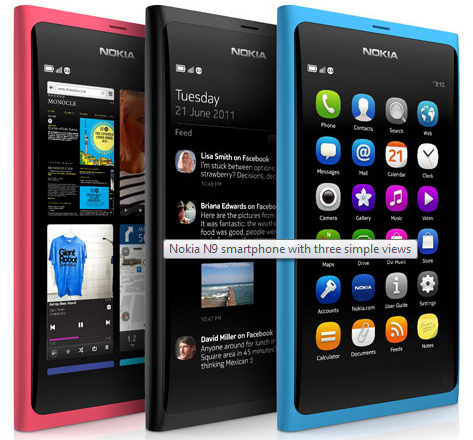
1. Icon launcher currently do not have any foldering capability. However, this feature is currently being developed and will be added in the next N9 OS update.
http://talk.maemo.org/showpost.php?p=103....
2. There is no native Korean input support. (Not even sure of it being able to display Korean fonts) However, it may be possible via other means. (Nokia N900 was able to get Korean input via mscim package)
3. You will be able to close the active foreground app via swiping from top to bottom (downwards) if you enable this from the UI settings.
http://talk.maemo.org/showpost.php?p=103....
4. N9 OS uses debian apt package management. You can even install .deb files via the web browser. (Much like N900)
http://forum.meego.com/showpost.php?p=22....
http://forum.meego.com/showpost.php?p=22....
5. The lock screen and the 3 homes are portrait only. No quick launcher in landscape.The lock screen and the 3 home screens (task switcher, notifications, app launcher are displayed in portrait orientation only. They will not rotate to landscape mode.
http://forum.meego.com/showpost.php?p=23....
6. Web browser supports multitouch of up to 6 fingers at once. (maybe more?)
http://forum.meego.com/showpost.php?p=23....
7. One of the videos of N9 on youtube showed Fennec icon in the app launcher. Fennec is basically a beta version of Firefox Mobile web browser. So it seems N9 will have at least 1 proper alternative web browser if needed.
http://talk.maemo.org/showpost.php?p=103....
http://forum.meego.com/showthread.php?t=....
https://wiki.mozilla.org/Mobile/Fennec
8. N9 can play flash videos using its media player. But not within the web browse due to the lack of Adobe Flash plugin. (N9 can also play other common video formats. Even 720p MKV files out of the box)
http://talk.maemo.org/showpost.php?p=103....
9. It has support for FM TXRX (FM radio receiver/transmitter) in hardware. There is no software for it right now that’s all. So it may become available later on. (Update: There is a FM TX/RX chip and the Receiver is confirmed working. However, there is no TX antenna in the N9 apparently so the transmitter signal is too weak to work. 3.5mm socket / earphones cannot be used as an antenna either.)
http://talk.maemo.org/showpost.php?p=103....
http://forum.meego.com/showpost.php?p=23....
http://forum.meego.com/showpost.php?p=23....
10. In Australia, Blue and Black versions be available in the 16GB model. (What? No Pink?!) 64GB model will only be available in black. However, this decision could change.
http://twitter.com/#!/NokiaAustralia/sta....
11. In Australia, I was told by the Nokia product manager than they hope to have this released to most major carriers around August. (Exact word used was “August-ish”) UPDATE JUL/24: I have now been told by Nokia marketing manager (in Australia) that it is due in September. Official launch date is yet to be confirmed with the carriers.
12. N9 camera sensor is a unique 13:9 ratio sensor. This allows for 8MP 4:3 ratio and 7MP 16:9 or 3:2 ratio photos. What is interesting about all this is that unlike most other mobile phones is that it actually contains more information horizontally than shooting at 4:3 ratio. So you do not have to sacrifice a lot of the image like the other phones when shooting at wider ratio. You can read other interesting facts about the N9 camera from the link below:
http://mynokiablog.com/2011/06/21/video-....
13. N9 also has the fastest camera of all mobile phones. (Even against most digital cameras!)
http://conversations.nokia.com/2011/06/2....
14. Some discussions are apparently taking place about possibility of open sourcing the lockscreen at least so that widgets or any other useful modifications can be implemented. I really hope good outcome comes out of this.
http://forum.meego.com/showpost.php?p=22....
15. Here is a nice video by MichaelxHell showing the virtual keyboard and swype keyboard on the N9.
16. N9 is the first Nokia device that supports multiple Mail for Exchange accounts setup in the phone. (I was told of this during Nokia Australia N9 media event)
17. “Colin Giles, Nokia’s Executive VP of Sales, has disclosed that the Nokia N9 will be retailing at US$660 and US$749 for the 16GB and 64GB models respectively. He revealed this information in a meeting with Malaysian journalists.” Well, at least we have a basic guideline price now. Obviously the price could change by the time it’s released and will differ from country to country.
http://asia.cnet.com/crave/nokia-n9-hand....
18. IMAP IDLE for email is supported and works on the N9.
http://forum.meego.com/showpost.php?p=23....
19. Swipe action is disabled in games if the game is programmed to disable it while playing. This can be seen starting at 2:50 into this video. So you don’t have to worry about accidently swiping the game off the screen during gameplay.
20. As N9 supports caldav, you can simply add your google galendar account to N9 from Accounts -> Caldav menu. For google contacts, you just need to setup a google talk account in the N9 for it to integrate with the N9 Contacts.
http://forum.meego.com/showpost.php?p=23....
21. Photo sharing is pluggable (meaning it supports plug-ins) just like the N900 as it is made by the same team. So we should be able to get many different services plugged into the image sharing. (such as twitter, imgur, yfrog etc)
http://conversations.nokia.com/2011/06/2....
http://meego.gitorious.org/meego-sharing....
22. According to Jens Wilke (N9 Product Manager) about using the physical button for taking photos: “Use of the volume +/- keys was considered, but the interaction design opposed this due the keys being situated on the left side of the device when holding it in landscape mode. Power key was also proposed, but it’s dedicated for other actions, e.g. screen locking, and was considered problematic. As you say, this mapping could happen through some app. Then maybe even the proximity sensor could be used.” So it seems this might be possible if someone finds a way to map the action to the camera app.
http://conversations.nokia.com/2011/06/2....
23. Another tidbit on the camera side of the N9. Camera architecture on the N9 is OPEN. Meaning that 3rd party camera apps and RAW access is possible later on.
http://conversations.nokia.com/2011/06/2....
24. I’m quoting a lot from Quim Gil (Nokia Meego dev) as what he says is pretty much all insider info and proper fact. Here is another tidbit about the contacts in N9. “Access to Contacts: you can star specific contacts, making them appear at the top of the list of contacts. You can leave the Contacts app open and have it always in the Tasks home.”
http://forum.meego.com/showpost.php?p=23....
25. Well, no idea how I missed this. Jukka Eklund is a product manager at Nokia and a member at TMO (Kozzi) has found some interesting IRC chat that went on with him involved. It seems USB OTG feature just needs to be enabled in software as the hardware is already there. (Like the N900) Update: N9 kernel seems to mention USB OTG as well.
http://talk.maemo.org/showpost.php?p=103....
http://forum.meego.com/showpost.php?p=23....
26. Ogg Vorbis audio codec support isn’t mentioned in any of the official Nokia N9 spec page such as this. But it is supported according to the official N9 developer site as confirmed by Quim.
27. You do not need to flash a hacked kernel or jailbreak the N9 to gain superuser/root access. It’s as simple as just enabling the developer mode from the Security settings menu and voila, you now have root access to the xterminal, file system etc. Can’t be much simpler really.
28. Front proximity sensor is in use in a similar manner to the Nokia N8/E7. You can simply flip the phone over to face down to silence calls and alarms. Also, AMOLED screen is put to use as well via having clock and call/sms etc notifications (similar to Nokia Sleeping Screen) being visible all the time. But it will turn off when proximity sensor is covered. (such as in a pocket/handbag etc)
http://forum.meego.com/showpost.php?p=23....
29. Unlike the Nokia N900, N9 supprts multiple app downloads and installs at the same time.
http://forum.meego.com/showpost.php?p=23....
30. Now this is a BIG one. Adobe Flash content is supported in Fennec web browser. (Firefox Mobile) Default browser does not but at least you can get flash content using the other browser. So it seems Fennec will be very popular amongst N9 users. =)
http://konttoristhoughts.blogspot.com/20....
31. Another tidbit. DLNA stack is there on the device by default, but not in use. Nokia didn’t have time to test everything so they have decided to leave the settings menu out. But they may bring this back into the UI via the upcoming updates or 3rd party app can be made to enable this support even from day 1 it seems!
http://konttoristhoughts.blogspot.com/20....
32. Tidbit about the camera app. I’ll be quoting what Damian Dinning said here. “The quickest way to launch the camera with the sales release sw is to bring up the lock screen, this is either two taps on the display or a press of the lock button on the side. Slide the screen up around 1cm or so to reveal the shortcuts. Tap the camera icon to launch the camera. It’s best to leave the camera running in standby mode in the background, it will launch faster. It will remain in the background after first launch unless you explicitly close it from the ‘recents’ homescreen.” So yeah, it seems the multitasking capability and 1GB of RAM makes is natural to leave most apps just “open” in the background to allow them to be launched faster. =)
http://conversations.nokia.com/2011/06/2....
33. N9 does not support Skype video calling. (I was told of this at the Nokia Media event) Not sure if it will be enabled in the future like the N900.
34. It seems the 3 main homescreens’ portrait orientation can be changed to landscape with a bit of tinkering for those who want it this way or is lucky enough to have an N950. But really, Meego Harmattan UI was made with portrait orientation in mind so it seems there some graphical glitches when this is enabled. (but it’s still very early days so anything can change…..)
http://forum.meego.com/showpost.php?p=25....
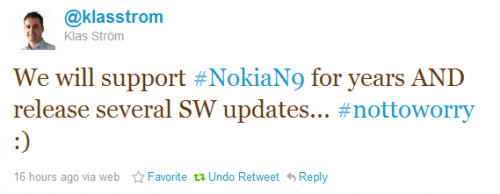
35. Klas Strom @ Nokia tweeted something interesting today. (see below) “years” to me means at least more than 1 year. Several SW updates sounds good however. I prefer frequent (every 3-4 months) small updates than 1 large update once a year or so. So I hope this is what they plan to do with the N9.
36. There is no official themes support in N9. However, it does support theming internally and may be easily enabled or applied with a third party GUI/app. All in all, it seems the actual GUI is quite customizable and it might be all up to the community on how it can be customized/improved. Thanks to kanishou (a Nokian) for this info.
http://talk.maemo.org/showpost.php?p=104....
37. An oldie but a goldie. User manual in the N9 says “This phone supports the 802.11a, 802.11b, 802.11g, and 802.11n WLAN protocols. You can create an 802.11n connection using either the 2.4 or 5 GHz frequency band.” I can only assume this means it supports simultaneous dual-band as well. But even if not, it’s good to see that it supports the 5GHz frequency.
38. Bluetooth version 4 seems unlikely now as it seems the N9 sports a TI 1273 chipset instead of the 1273L chipset. (Maybe this is incorrect? See update)
Chip Info - http://talk.maemo.org/showpost.php?p=105....
Reason - http://talk.maemo.org/showpost.php?p=105....
UPDATE: But this might mean it’s now supported now! Getting confused….
http://talk.maemo.org/showpost.php?p=105....
changed: NikMan (28.9.2012, 8:26)
|


