| |
Dober dan.
Na MacBooku se mi je pojavil stop znak in se mi sploh ne prižge več. Ima kdo kako idejo, kako rešit problem?
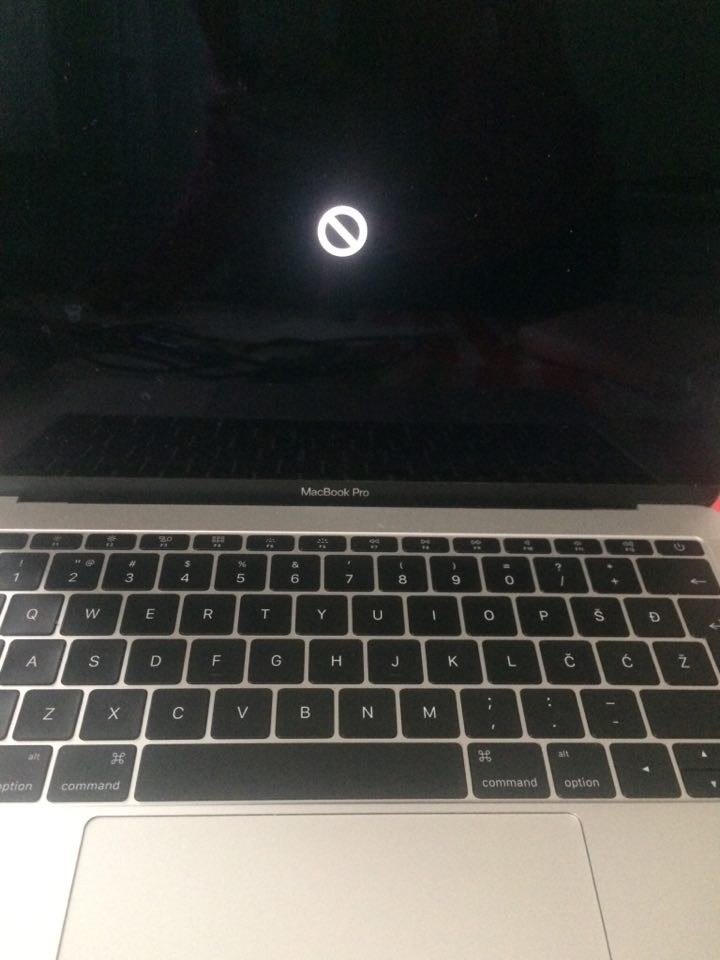
|
| |
| |
Resetiraj računalnik in drži tipki Command + R.
Potem pa bi morala dobiti neke možnosti za nadaljevanje.
|
| |
| |
Našel sem nekaj rešitev v angleškem jeziku:
Potential fixes:
Reset the PRAM
Hold the Options-Command-P-R keys immediately after pressing the power button and the system will continually reset and make the boot chimes while they are held down. Let it cycle a few times and then release the keys and hope the system boots.
Repair the disk
Since you cannot boot into OS X, try booting to the OS X installation DVD (or a third-party utility disk (DiskWarrior, TechTool Pro, or Drive Genius) and run both file-system checks (repair disk) and permissions fixes on the boot drive.
Replace the mach_kernel file
If you have access to another Mac, and both it and your current one have FireWire capability, connect them and reboot your current system with the "T" key held down. This will put it in Target Disk mode and it should appear on the second Mac's desktop. Go to the second computer and insert the OS X installation DVD (it must be the same version of OS X as what is running on the target computer) and launch the Terminal. Then run the following command to copy the mach_kernel file from the DVD to the attached FireWire hard drive:
(Note, if your second Mac's hard drive is named the same as the mounted FireWire hard drive, rename the FireWire hard drive to something else, such as "Macintosh HD2"
sudo cp /Volumes/"DVD_MEDIA_NAME"/mach_kernel /Volumes/"FIREWIRE_HD"
Copy and paste that command, and then change the name of "DVD_MEDIA_NAME" to the name of the OS X installation DVD, and change the name of "FIREWIRE_HD" to the name of the mounted FireWire drive.
After this command has been completed, eject the FireWire disk from the system and press the power key on the affected computer to turn it off. When you power it back on, hopefully it will boot normally again.
Reinstall
If you have a Time Machine backup, restore a working version of your system with that. However, if you reinstall OS X, be sure to perform an "Archive and Install" (OS X Snow Leopard automatically does this unless the drive is erased) to preserve user settings and installed applications. While this should keep your data safe, as an extra precaution you might consider using Target Disk mode on your system so it can appear on another Mac, and then manually back up your files, which should mostly be in the /"FIREWIRE_DISK"/Users/"username"/ folder.
|
| |
Prikazujem 1 od skupno 1 strani |
|


